Wahoo KICKR Bike V2 virtual shifting with MyWhoosh
Wahoo KICKR Bike V2 is an FTMS-compatible smart trainer likely to work with BikeControl virtual shifting on MyWhoosh. Pair the trainer directly to BikeControl, customize gear ratios, and ride on iOS, Android, Windows, or Mac.
Last updated:
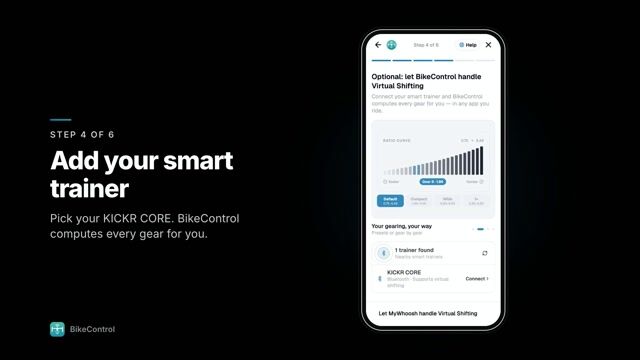
How to get virtual shifting on Wahoo KICKR Bike V2 with MyWhoosh
- Install BikeControl. Install BikeControl on iOS, Android, Windows, or Mac.
- Pair Wahoo KICKR Bike V2. Pair your Wahoo KICKR Bike V2 directly to BikeControl over Bluetooth, so BikeControl can control its resistance.
- Configure gear ratios. Customize gear ratios inside BikeControl to match your real bike or preferred range.
- Connect MyWhoosh. In MyWhoosh, pair the trainer BikeControl publishes, over Bluetooth or Wi-Fi, instead of the Wahoo KICKR Bike V2 itself.
- Start virtual shifting. Shift with your controller: BikeControl applies each gear as resistance on the Wahoo KICKR Bike V2, and MyWhoosh sees your effort.
How MyWhoosh fits in
- Connecting MyWhoosh to the trainer
- MyWhoosh doesn't pair with the Wahoo KICKR Bike V2 directly any more: it pairs with the trainer BikeControl publishes, over Bluetooth or Wi-Fi. BikeControl keeps the connection to the Wahoo KICKR Bike V2 and changes its resistance when you shift, so MyWhoosh needs no virtual shifting of its own.
- MyWhoosh actions on your controller
- Shifting happens in BikeControl, but the other buttons can still control MyWhoosh: its default mapping covers steer left and right, emotes, navigate left and right, and toggle the on-screen UI, sent over Network or Accessibility.
- Platforms
- MyWhoosh on iPhone, iPad, Apple TV, Android, macOS, and Windows. BikeControl itself runs on iOS, iPadOS, Android, Windows and macOS.
- Official support
- MyWhoosh supports BikeControl officially through the open OpenBikeControl protocol, on every platform including Apple TV.
- The Wahoo KICKR Bike V2's own shift buttons
- MyWhoosh doesn't read the Wahoo KICKR Bike V2's shift buttons on its own. BikeControl picks them up and shifts for you.
Frequently asked questions
Does the Wahoo KICKR Bike V2 support virtual shifting in MyWhoosh?
The Wahoo KICKR Bike V2 is FTMS-compatible, so it is expected to work with BikeControl virtual shifting. Pair the trainer directly to BikeControl and it adds virtual shifting in MyWhoosh, even if the app has no native virtual shifting support.
Does MyWhoosh need to support virtual shifting natively?
No. BikeControl sends the gear’s resistance to the trainer; MyWhoosh just sees a normal trainer, so virtual shifting works without native support in the app.
How does MyWhoosh connect to the Wahoo KICKR Bike V2 with BikeControl?
MyWhoosh pairs with the trainer BikeControl publishes, over Bluetooth or Wi-Fi, and BikeControl stays connected to the Wahoo KICKR Bike V2. MyWhoosh runs on iPhone, iPad, Apple TV, Android, macOS, and Windows.
Can I customize the gear ratios?
Yes. Gear configurations are fully customizable in BikeControl with 1 to 30 gears, named configurations, and a drag-to-tune curve preview.
Is virtual shifting free in BikeControl?
Virtual shifting is included for up to 20 minutes per day in the free/base version. BikeControl Pro (around 2.50 EUR/USD per month) removes the time limit.
Use the Wahoo KICKR Bike V2 with other apps
- Wahoo KICKR Bike V2 with Zwift
- Wahoo KICKR Bike V2 with Rouvy
- Wahoo KICKR Bike V2 with Biketerra
- Wahoo KICKR Bike V2 with TrainingPeaks
More about the Wahoo KICKR Bike V2, the Virtual Shifting hub, or download BikeControl — free to try on iOS, Android, Windows, and macOS.