Wahoo KICKR V5 virtual shifting with MyWhoosh
Wahoo KICKR V5 is a confirmed-working smart trainer with BikeControl virtual shifting on MyWhoosh. Pair the trainer directly to BikeControl, customize gear ratios, and ride on iOS, Android, Windows, or Mac.
Last updated:
How to get virtual shifting on Wahoo KICKR V5 with MyWhoosh
- Install BikeControl. Install BikeControl on iOS, Android, Windows, or Mac.
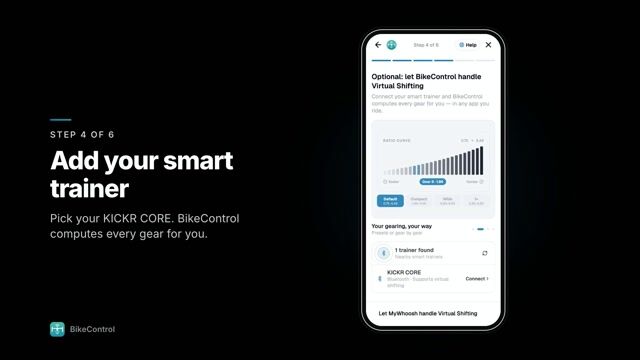
- Pair Wahoo KICKR V5. Pair your Wahoo KICKR V5 directly to BikeControl over Bluetooth, so BikeControl can control its resistance.
- Configure gear ratios. Customize gear ratios inside BikeControl to match your real bike or preferred range.
- Connect MyWhoosh. In MyWhoosh, pair the trainer BikeControl publishes, over Bluetooth or Wi-Fi, instead of the Wahoo KICKR V5 itself.
- Start virtual shifting. Shift with your controller: BikeControl applies each gear as resistance on the Wahoo KICKR V5, and MyWhoosh sees your effort.
How MyWhoosh fits in
- Connecting MyWhoosh to the trainer
- MyWhoosh doesn't pair with the Wahoo KICKR V5 directly any more: it pairs with the trainer BikeControl publishes, over Bluetooth or Wi-Fi. BikeControl keeps the connection to the Wahoo KICKR V5 and changes its resistance when you shift, so MyWhoosh needs no virtual shifting of its own.
- MyWhoosh actions on your controller
- Shifting happens in BikeControl, but the other buttons can still control MyWhoosh: its default mapping covers steer left and right, emotes, navigate left and right, and toggle the on-screen UI, sent over Network or Accessibility.
- Platforms
- MyWhoosh on iPhone, iPad, Apple TV, Android, macOS, and Windows. BikeControl itself runs on iOS, iPadOS, Android, Windows and macOS.
- Official support
- MyWhoosh supports BikeControl officially through the open OpenBikeControl protocol, on every platform including Apple TV.
Frequently asked questions
Does the Wahoo KICKR V5 support virtual shifting in MyWhoosh?
Yes. The Wahoo KICKR V5 is confirmed to work with BikeControl virtual shifting. Pair the trainer directly to BikeControl and it adds virtual shifting in MyWhoosh, even if the app has no native virtual shifting support.
Does MyWhoosh need to support virtual shifting natively?
No. BikeControl sends the gear’s resistance to the trainer; MyWhoosh just sees a normal trainer, so virtual shifting works without native support in the app.
How does MyWhoosh connect to the Wahoo KICKR V5 with BikeControl?
MyWhoosh pairs with the trainer BikeControl publishes, over Bluetooth or Wi-Fi, and BikeControl stays connected to the Wahoo KICKR V5. MyWhoosh runs on iPhone, iPad, Apple TV, Android, macOS, and Windows.
Can I customize the gear ratios?
Yes. Gear configurations are fully customizable in BikeControl with 1 to 30 gears, named configurations, and a drag-to-tune curve preview.
Is virtual shifting free in BikeControl?
Virtual shifting is included for up to 20 minutes per day in the free/base version. BikeControl Pro (around 2.50 EUR/USD per month) removes the time limit.
Use the Wahoo KICKR V5 with other apps
- Wahoo KICKR V5 with Zwift
- Wahoo KICKR V5 with Rouvy
- Wahoo KICKR V5 with Biketerra
- Wahoo KICKR V5 with TrainingPeaks
More about the Wahoo KICKR V5, the Virtual Shifting hub, or download BikeControl — free to try on iOS, Android, Windows, and macOS.