
BikeControl vs QZ: which one do you actually need?
They solve different problems. QZ (qdomyos-zwift) makes equipment that does not speak the standard trainer protocol — Peloton, Echelon, treadmills, rowers — appear to Zwift as a smart trainer. BikeControl is built around everything surrounding virtual shifting: your shifters and controllers, and how the gears feel, in any trainer app. BikeControl is supported officially by MyWhoosh, TrainingPeaks Virtual, Strappo, Biketerra, Ride Cave and Velotoss.
Both add virtual gearing. If your bike already works with your trainer app and you want better shifting, that is BikeControl. If your bike does not show up in the app at all, start with QZ.




You can try BikeControl first on iOS, macOS, Android and Windows.
Who wrote this
Written by Jonas Acker, who makes BikeControl. We’re an interested party, so every QZ claim below links to QZ’s own docs.
Two apps, two jobs
BikeControl
Everything surrounding virtual shifting. It reads the shifter or controller you already have — Zwift Click, Play or Ride, Shimano Di2, SRAM AXS, WHEELTOP EDS, a gamepad, Bluetooth buttons — and turns it into shifting, steering and actions in any trainer app. Its own virtual shifting sits between the trainer and the app — FTMS, FE-C over BLE or Zwift Ready — and simulates a drivetrain, so gear feel follows you across apps.
Best for: any smart trainer, any trainer app, and riders who care how the gears feel.
QZ (qdomyos-zwift)
A virtual bridge. Its focus is on connecting fitness equipment that Zwift and other apps cannot see — Peloton, Echelon, NordicTrack and Domyos bikes, treadmills, rowers, ellipticals — and re-broadcasting it as a standard smart trainer. It also works with standard FTMS smart trainers. Virtual gearing, Zwift Click and Play support and a Bluetooth-remote shifter are built on top of that.
Best for: equipment the trainer app cannot pair with on its own.
BikeControl vs QZ, row by row
Checked against QZ’s README, wiki, App Store listing and source code on 2026-09-15. Each row links to the source for the QZ column; QZ may have changed since.
| Feature | BikeControl | QZ |
|---|---|---|
 | Stronger here: Official partner since April 2026. BikeControl is MyWhoosh’s official solution for controller input — MyWhoosh implements the OpenBikeControl protocol and recognises BikeControl directly. Watch on YouTube | Weaker here: No partnership stated. Source |
 | Stronger here: Official partner since June 2026. Implements the OpenBikeControl protocol — TrainingPeaks helped shape it — with 28 mappable actions. | Weaker here: No partnership stated. Source |
 | Stronger here: Official partner since July 2026. Strappo implements the OpenBikeControl protocol. | Weaker here: No partnership stated. Source |
 | Stronger here: Official partner since October 2026. Biketerra implements the OpenBikeControl protocol over Bluetooth. | Weaker here: No partnership stated. Source |
 | Stronger here: Official partner since October 2026. Ride Cave implements the OpenBikeControl protocol over Bluetooth. | Weaker here: No partnership stated. Source |
 | Stronger here: Official partner since October 2026. Velotoss implements the OpenBikeControl protocol over Network. | Weaker here: No partnership stated. Source |
| Core job | Both: Everything surrounding virtual shifting: the shifters and controllers you use, and how the gears feel, in any trainer app. | Both: Non-standard equipment → a trainer app, by emulating a smart trainer. Source |
| Virtual shifting works in | Stronger here: Zwift, MyWhoosh, Rouvy, Biketerra, TrainingPeaks Virtual and any other trainer app — BikeControl sits between the trainer and the app. | Weaker here: Zwift, Rouvy, MyWhoosh, TrainingPeaks and IndieVelo, per the QZ wiki. Source |
| Virtual front derailleur | Stronger here: Yes — two chainrings with configurable teeth counts. 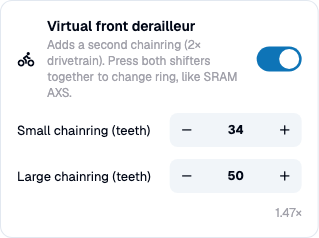 | Weaker here: Not documented — one crankset size setting. Source |
| Gear count and ratios | Both: 1–30 gears, custom ratios, named configurations per trainer. 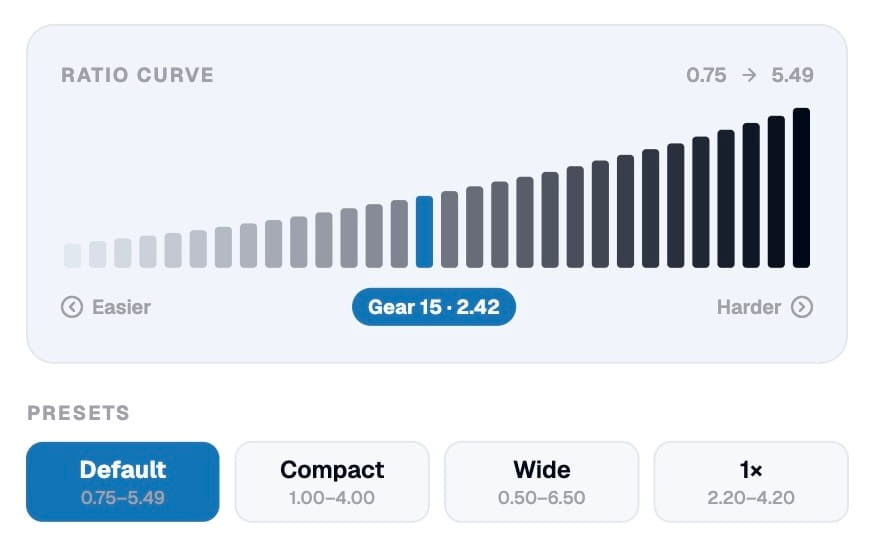 | Both: Custom gear table, crankset, cog and wheel size, gain and offset, or Zwift’s own ratio table. Source |
| Drivetrain simulation | Both: Rider and bike weight, grade smoothing, cadence filter. | Both: Rider and bike weight; gearing from crankset, cog and wheel size. No grade smoothing documented. Source |
| Shifters and controllers | Stronger here: Zwift Click, Click v2, Play and Ride; Shimano Di2; SRAM AXS (every button); WHEELTOP EDS; Wahoo KICKR Bike; CYCPLUS BC2; Thinkrider VS200; gamepads; Bluetooth buttons; keyboard; OpenBikeControl hardware. Controller comparison | Weaker here: Zwift Click v1 and v2, Zwift Play and Ride, Bluetooth volume remotes, on-screen gear tiles. Source |
| Zwift Click v2 | Stronger here: No daily unlock in right-side-only mode (BikeControl 6.4 and newer); using both controllers still needs the daily unlock in Zwift. Read the guide | Weaker here: Needs unlocking in Zwift once a day, per the QZ wiki. Source |
| Button gestures | Stronger here: Single, double and long press per button, each with its own action. | Weaker here: Not documented. Source |
| Steering | Stronger here: Elite Sterzo Smart, Elite Square, Zwift Play and Ride, phone tilt. | Weaker here: Elite Sterzo Smart; steering angle tile for the Elite Rizer. Source |
| Peloton, Echelon, NordicTrack, treadmills, rowers | Weaker here: No. BikeControl works with FTMS, FE-C over BLE and Zwift Ready smart trainers. Compatible smart trainers | Stronger here: Yes — this is what QZ is for. Source |
| Works with any FTMS smart trainer | Both: Yes. | Both: Yes. Source |
| Reported power | Stronger here: The trainer’s own numbers, unchanged. BikeControl has no setting to raise or lower them, so MyWhoosh, Rouvy, TrainingPeaks Virtual, Strappo, Biketerra, Ride Cave and Velotoss get what you actually pedalled. | Weaker here: Adjustable: watt offset and gain settings, meant for calibration and for mapping rowers and ellipticals onto a bike. Source |
| Platforms | Both: iOS, Android, Windows, macOS. | Both: iOS, Android, macOS, Linux, Windows. Source |
| Price | Stronger here: A trial to check it works with your setup. Base is a one-time purchase of about 4.99 USD (each store sets regional prices). Pro (BikeControl's own virtual shifting, all platforms) is a subscription; you can try its virtual shifting 20 minutes a day, a daily trial of Pro. See pricing | Weaker here: €7.99 one-time on the App Store, priced per region. Windows and macOS need a Patreon membership after a ten-minute trial. Source |
| Desktop licensing | Stronger here: The same trial on Windows and macOS as on iOS and Android, with no membership check. One Pro subscription covers every platform. | Weaker here: Windows and macOS builds check for a Patreon membership and close after a ten-minute trial if none is found. Source |
| Source code | Both: Public on GitHub. OpenBikeControl/bikecontrol | Both: Public on GitHub. cagnulein/qdomyos-zwift |
The side a row favours (both, when it's even)The other sideQZ column as of 2026-09-15.
Which one should you install?
Choose BikeControl if…
- You ride MyWhoosh, TrainingPeaks Virtual, Strappo, Biketerra, Ride Cave or Velotoss — they support BikeControl officially, with no bridge in between.
- You want the most customizable virtual shifting: a virtual front derailleur, your own ratios, your weight and grade smoothing, the same in every app.
- You want to shift with Di2, AXS, WHEELTOP or a gamepad, or use every button on your levers individually.
- You ride on Windows or macOS: BikeControl has the same trial there, with no membership check.
Choose QZ if…
- Your bike, treadmill or rower does not appear in Zwift or your trainer app at all. That is the problem QZ solves and BikeControl does not.
- You want a fully GPL-licensed app, and you are on iOS, Android or Linux where no Patreon check applies.
Frequently asked questions
Is QZ a free alternative to BikeControl?
What does QZ do that BikeControl does not?
What does BikeControl do that QZ does not?
Which one handles the Zwift Click v2?
Does either app add lag to shifting?
Does either app change my power numbers?
What is OpenBikeControl?
Try BikeControl before you decide
Pair your controller, ride, and see if it is the right fit. The trial is enough to find out.