Best Gaming Controller for Cyclists: Every Option Compared
By Jonas Bark · March 25, 2026 · Updated July 10, 2026
Introduction
Tapping through menus on a sweat-covered phone screen mid-ride is nobody's idea of a good time. A physical controller on your handlebars lets you shift gears, steer, skip tracks, or take a screenshot without ever breaking your rhythm.
But which one should you get? The market ranges from $8 Bluetooth remotes off Amazon to smart bikes with buttons built into the hoods. Some controllers use a dedicated Bluetooth protocol that cycling apps can read cleanly; others show up as generic media devices with real limitations. Some give you two buttons, others give you twelve.
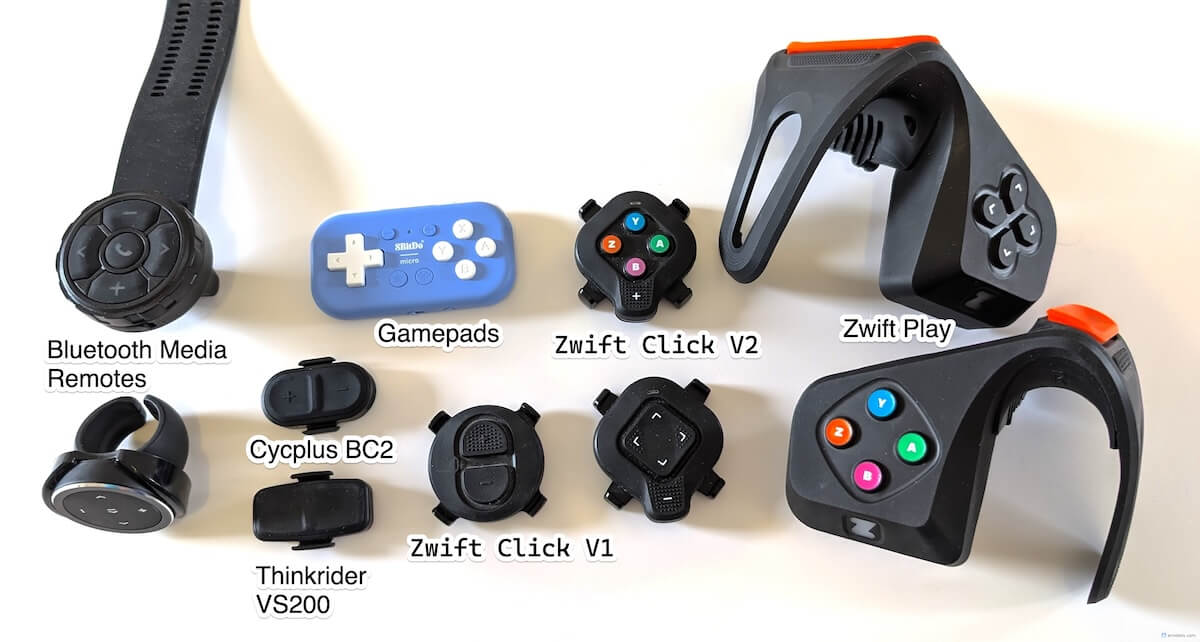
In this post we compare every option in the hunt for the best controller for indoor cycling (let us know if we missed some!) — gaming controllers and gamepads, dedicated hardware you buy specifically for indoor cycling, and gear you might already own. We'll look at mounting options, build quality, app compatibility, how many actions you can map, and price, so you can figure out which option fits your setup.
This comparison reflects our personal opinion.
BikeControl
BikeControl allows you to use the available hardware with any trainer app out there, including MyWhoosh, Zwift, Rouvy, TrainingPeaks, and many others. Note that some trainer apps support some of the mentioned controllers natively as well. Not only does BikeControl allow you to use your controllers buttons not only for controlling anything in the trainer app, but also for controlling your phone/computer (e.g. media controls, screenshots, launching commands, and more)
Read more about it at BikeControl.app - Rest assured, BikeControl supports all the mentioned controllers and is available on Windows, iOS, Android, and macOS.
Wondering how BikeControl compares to QZ (qdomyos-zwift)? We wrote up BikeControl vs QZ: what each app is actually for, and where each one wins.
We bought them all because we need to: with BikeControl we want to develop the ultimate app for your virtual shifting and controlling needs, and that means supporting all the hardware out there. We also wanted to find out which one is the best for us, and share our findings with you.
The Contenders
Dedicated Hardware
- Zwift Click V2 — Zwift's latest proprietary controller
- Zwift Play — Zwift's attempt at a do-it all controller
- Thinkrider VS200 — purpose-built cycling remote, mounts to handlebars
- Cycplus BC2 — compact Bluetooth cycling remote
- Bluetooth Media Remotes — many available for under $10
- Gamepads (e.g. 8BitDo Micro) — small Bluetooth gamepads repurposed for cycling
Zwift Click V2
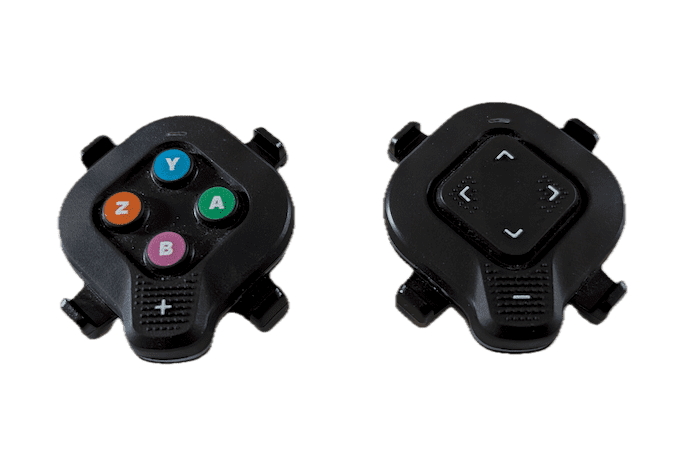 Let's start with the one that has the biggest market share by far. The second version of Zwifts Click devices boasts a total of 10 buttons across two dedicated devices, powered by a CR2032 battery. This device comes pre-bundled with many modern smart trainer hardware, or at a very affordable price bundled with the "Zwift Cog." It's a well-thought-out device that can be mounted almost everywhere you want. Given it's the third iteration of Zwift Click devices, you have to expect they learned a thing or two about the hardware quality, and it shows. It feels premium and the buttons have a great haptic. And when used with Zwift only, it's great.
But this device is meant to be used with Zwift only. We've since written a dedicated guide to using the Click V2 with other trainer apps, but here's the gist of it: The Click V2 has a proprietary firmware on it that demands to talk to the Zwift servers every 24 hours and does so using encryption. There's no way around this. Workarounds exist to use it with other software, and BikeControl tries its best to make it as seamless as possible, but it's still a nuisance to get it to work reliably. This makes this otherwise great product a real pain to use, and we really hope Zwift reconsiders this with a firmware update. They did it before with earlier generations. Given that, we cannot recommend this device unless you want to stick with Zwift.
-
Side note: Version 1 (with two buttons) does not have this firmware restriction and can be a good choice if you're happy with two buttons. With BikeControl you can assign a total of 6 gestures (single, double and long click) on those buttons, so that is definitely a plus with that combination.
-
⭐️⭐️ Stars. Without firmware restrictions: 5 Stars. - Availability: Sold online by Zwift
- Website: zwift.com
Zwift Play
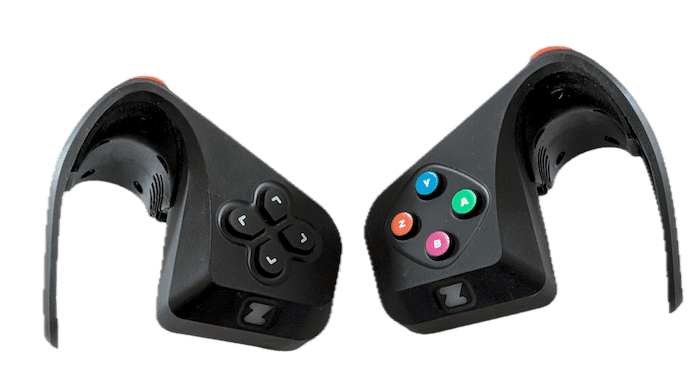 The Zwift Play devices do not have this firmware limitation. Straightforward to set up and works great with BikeControl. Rechargeable with USB-C, mountable only on a drop bar, and dozens of usable buttons. They even vibrate, e.g. during shifting.
The ergonomic of it isn't for every one. For us, it feels like it can be in the way of me holding onto the drop bar. The button feel is good, but not great, yet the "shoulder" buttons are awesome.
-
When we use them, we tend to only use one of them, as there are enough buttons (7) and you can assign them in BikeControl to any action you want. No longer sold online, but you can get them very cheap second hand. Recommended!
-
⭐️⭐️⭐️⭐️ Stars - Availability: Second-hand market only
- Website: zwift.com
Cycplus BC2
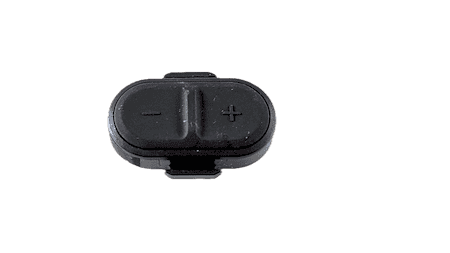 The smallest device of them all, and even boasts a rechargeable USB-C battery - Kudos to Cycplus for this! It was meant to be used in combination with their smart trainer, but can easily be used with BikeControl and therefore other apps. They mount on your handlebar via straps.
Build quality feels solid, and the buttons feel okay. In my opinion, the buttons need a bit more travel to be perfect, but they are definitely usable. You cannot reliably rest your finger on the button and press it repeatedly with ease.
-
They support long press, which is a big plus, as it allows you to assign more actions to the same button if used with BikeControl. E.g., single click to shift down, long click to steer your character on the road.
-
⭐️⭐️⭐️ Stars - Availability: their online shop or via China
- Website: cycplus.com
Thinkrider VS200
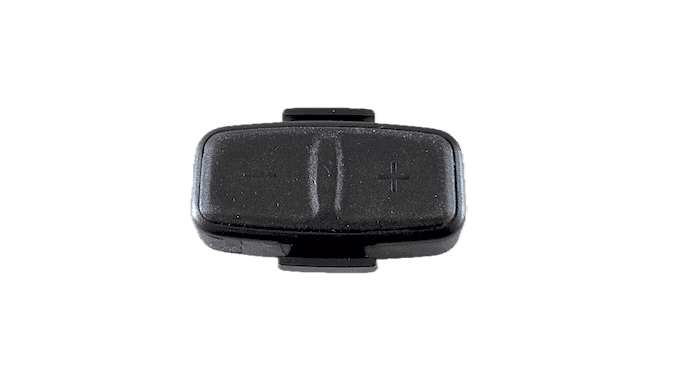 The latest contender in this series arrived on the market approximately in Autumn of 2025. A very similar form factor to the Cycplus BC2, sporting two buttons and a USB-C recharging option. Also meant to be used with their smart trainer, but can be used with BikeControl as well.
There are two major downsides of this product:
-
Long clicks are not supported (only "button down" is registered)
-
The button haptic is terrible: you need to press down harder than you should, and it's hard to hit the area that registers the button click.
-
⭐️⭐️ Stars - Availability: their online shop, but cheaper via China
- Website: thinkrider.com
Bluetooth Media Remotes
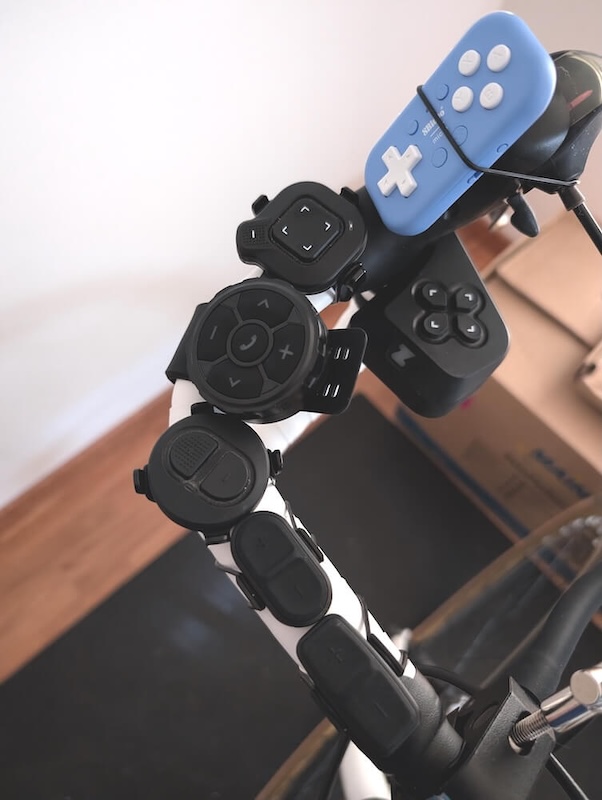
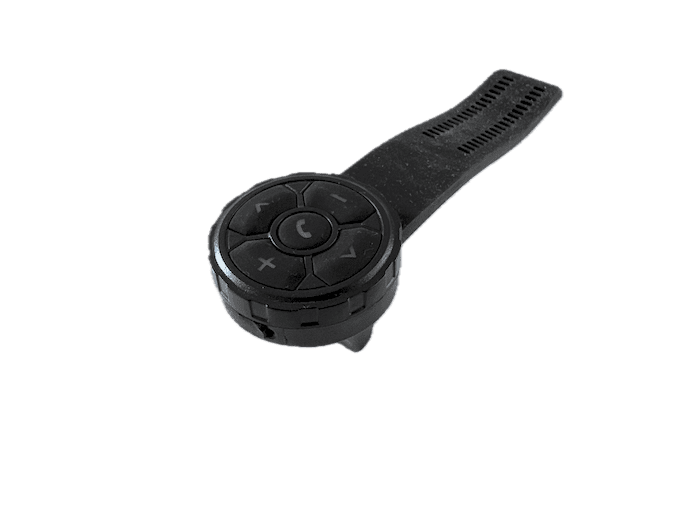 There are many options available on Amazon out there, most of them very cheap as they were produced in bulk and sold for many years already. Although they were usually meant for mounting on a motorcycle handlebar to control music on your phone, they can be also be used with BikeControl, but have a few major downsides:
-
many of them are bulky (check the image below), limiting the mounting options
-
the volume keys and music control buttons can only be detected when BikeControl acts as a "music player". Otherwise, they would control what they are meant to: music and volume.
-
some buttons may not be readable at all, as they are "stolen" by the operating system
-
long clicks are generally not supported
-
on some systems they appear as "audio output device", causing issues with your audio output
-
they need to be permanently paired to your device (Bluetooth Classic)
-
⭐️⭐️ Stars - Availability: sold via Amazon & co
Gamepads
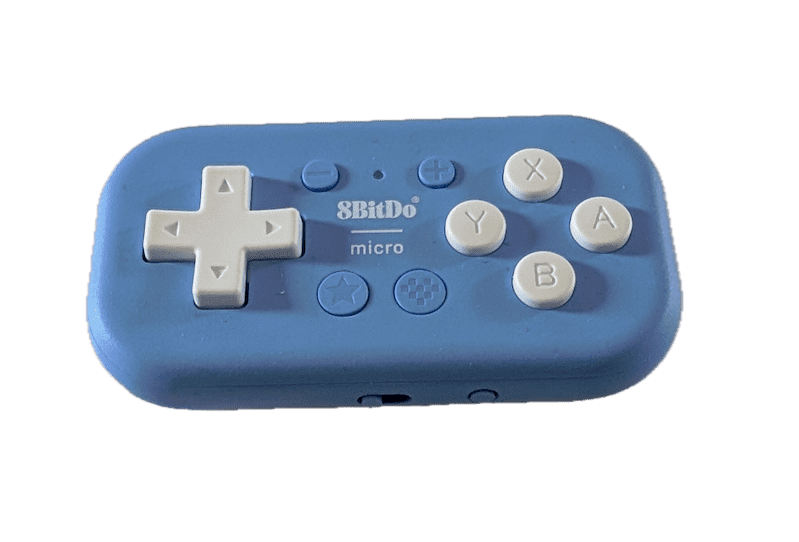 Tons of available options are out there, and some may fit well with what we have in mind: mounting them on a handlebar and using them to control, for example, virtual shifting. This is supported with BikeControl on any trainer app, but many options are not ergonomic and cannot be easily mounted on your handlebar.
-
I tried the 8bitdo micro and was pleased by the build quality and size, but mounting them isn't trivial at all. Compatibility varies by Gamepad and operating system.
-
⭐️⭐️ Stars - Availability: sold via Amazon & co
- Website: 8bitdo.com
Leveraging Existing Gear
- Zwift Ride — Zwift's smart bike with integrated buttons
- Wahoo KICKR Bikes — Wahoo's smart bikes with integrated buttons
- Shimano Di2 — electronic shifting levers you may already have on your bike
- SRAM AXS — wireless shifting levers you may already have on your bike
Zwift Ride
I tried it out at a friends' place, and the reviews generally speak for themselves: great customizability and solid build quality. The controller buttons are well integrated in the dropbar. Works great with BikeControl.
-
Currently on sale, so if you don't have a bike to mount on your smart trainer, it's a solid choice.
-
⭐️⭐️⭐️⭐️ Stars - Availability: sold via Amazon & co
- Website: zwift.com
Wahoo KICKR Bikes
I haven't tried them myself, so can't offer a recommendation. But what we can say, based on user feedback: its hood buttons work well with BikeControl, and accordingly with every major trainer app out there. So if you have a KICKR Bike, give it a try!
SRAM AXS
Now here's where it gets interesting: if you already have a bike with electronic shifters, why not use them for virtual shifting or controlling the trainer app as well? With BikeControl you can do that and it's fairly easy to set up! Connect your derailleur to BikeControl, configure the buttons to what you like, and you're pretty much good to go.
For a long time the closed SRAM AXS Bluetooth protocol only let apps detect that a button was pressed - not which one. Since BikeControl 6.3 that limitation is history: every individual button is recognized on its own - left and right paddles, the Bonus buttons on the hoods, wired Blips, even Vuka extension shifters - and each one can be freely assigned, with separate single and double press actions.
-
BikeControl backs up your original AXS button configuration during setup and restores it whenever you want, so your outdoor shifting stays exactly as you left it.
-
⭐️⭐️⭐️⭐️⭐️ Stars - Availability: Not applicable
Shimano Di2
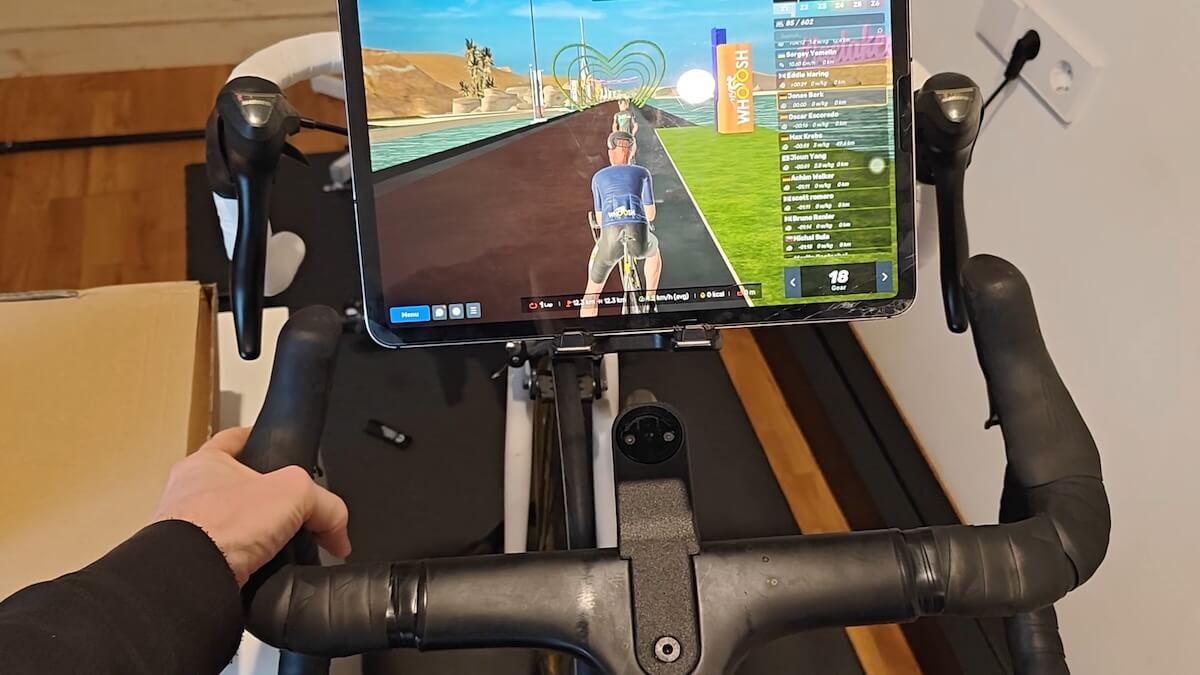
The integration of the Di2 from Shimano in BikeControl is awesome: after assigning the Di2 buttons to the "D-Fly channels", you're able to use them just fine in BikeControl. Single, Double, and even long presses are supported, so if your Di2 has two buttons on each side you'll get a total of 12 assignable actions. Shift like you'd do normally, steer using long presses - it's fun.
-
No need to fumble around with mounting dedicated extra hardware - just use what you already have. For us the ultimate solution (although we primarily use an old road bike with my smart trainer).
-
⭐️⭐️⭐️⭐️⭐️ Stars - Availability: Not applicable
Summary Table
| Controller | Mounting | Quality | Compatibility | Buttons | Assignable Actions | Price |
|---|---|---|---|---|---|---|
| Thinkrider VS200 | ⭐️⭐️⭐️⭐️⭐️ | ⭐️⭐️ | ⭐️⭐️⭐️⭐️⭐️ | 2 | 4 | 25 USD |
| Cycplus BC2 | ⭐️⭐️⭐️⭐️⭐️ | ⭐️⭐️⭐️ | ⭐️⭐️⭐️⭐️⭐️ | 2 | 6 | 25 USD |
| Zwift Click V2 | ⭐️⭐️⭐️⭐️ | ⭐️⭐️⭐️⭐️⭐️ | ⭐️⭐️ | 2x5 | 30 | 50 USD (bundled with Zwift Cog) |
| Zwift Play | ⭐️⭐️⭐️ | ⭐️⭐️⭐️⭐️⭐️ | ⭐️⭐️⭐️⭐️⭐️ | 2x6 | 36 | 30 USD (2nd hand) |
| BT Media Remote | ⭐️⭐️⭐️ | ⭐️ | ⭐️⭐️⭐️ | 2-5 | 4-10 | 8-20 USD |
| Gamepad (8BitDo Micro) | ⭐️ | ⭐️⭐️⭐️⭐️⭐️ | ⭐️⭐️ | varies | varies | 10-30 USD |
| Shimano Di2 | ⭐️⭐️⭐️⭐️⭐️ | ⭐️⭐️⭐️⭐️⭐️ | ⭐️⭐️⭐️⭐️⭐️ | 4-6 | 12-18 | not applicable |
| SRAM AXS | ⭐️⭐️⭐️⭐️⭐️ | ⭐️⭐️⭐️⭐️⭐️ | ⭐️⭐️⭐️⭐️⭐️ | 4+ | 8+ | not applicable |
| Zwift Ride | ⭐️⭐️⭐️⭐️⭐️ | ⭐️⭐️⭐️⭐️ | ⭐️⭐️⭐️⭐️⭐️ | 2x6 | 36 | 600 +- USD |
| Wahoo KICKR Bike | ⭐️⭐️⭐️⭐️⭐️ | ⭐️⭐️⭐️⭐️⭐️ | ⭐️⭐️⭐️⭐️⭐️ | 8 | ️ | 2000+ USD |
Those are hardware prices. BikeControl itself is free to try — the Base version is a one-time purchase of about 5.99 USD, and Pro is about €2.50/month for a cross-platform license, cloud keymap sync, and unlimited virtual shifting.
Our Picks
- Best dedicated hardware — Zwift Play
- Best budget option — Cycplus BC2
- Best if you already own it — Shimano Di2 or SRAM AXS
Did you know? There's a movement towards an open controller protocol, that can be implemented in future hardware and software, such as BikeControl, to achieve the goal of controlling your trainer. Check it out at openbikecontrol.org.
Conclusion
- There's no single best controller — it depends on your setup, budget, and how many actions you want
- BikeControl supports all of them, so the choice is purely about hardware preference
- Ready to connect yours? Download BikeControl and pick your device from the setup guides
Frequently Asked Questions
Can I use a gaming controller with Zwift or MyWhoosh?
Yes. Standard Bluetooth gamepads (PlayStation, Xbox, 8BitDo, and most generic models) work with every trainer app through BikeControl — including Zwift, MyWhoosh, Rouvy, Biketerra, and TrainingPeaks Virtual. Map the joystick to steering, face buttons to shifts, and shoulder buttons to workout intensity.
Do I need extra software to use these controllers?
Some apps support some controllers natively — Zwift reads its own hardware, Rouvy reads the CYCPLUS BC2. For every other combination, BikeControl is the bridge: it pairs to the controller and talks to the trainer app. It also adds remapping, button gestures, and media controls to natively supported devices.
How much does BikeControl cost?
BikeControl is free to try. The Base version is a one-time purchase of about 5.99 USD, and BikeControl Pro (about €2.50/month) adds a cross-platform license, cloud keymap sync, double click & long press gestures, and unlimited virtual shifting. Prices vary by store and region. Details at bikecontrol.app.
Is BikeControl free?
Free to try, yes — you can pair a controller and ride without paying. The one-time Base purchase (about 5.99 USD) unlocks it fully, and Pro adds a cross-platform license, cloud keymap sync, and unlimited virtual shifting on top.