7.0 - One Connection for Everything
By Jonas Bark · September 18, 2026
One Connection for Everything
Put your AirPods Pro 3 in, open BikeControl, and your heart rate shows up in Zwift. No strap, no second pairing, no new device in the trainer app's list — it comes in through the same "BikeControl" your gears already come through. That's the idea behind 7.0, and heart rate is only the first of it.
Sensors, through the Bridge
Until now the Bridge carried one thing: your trainer. Your trainer app connected to "BikeControl", got a smart trainer with virtual shifting, and that was the whole conversation. Heart rate came from a strap you paired separately; cadence and power were whatever the trainer reported.
7.0 opens that up. Under the trainer card there's now a Signals grid — heart rate, cadence, power — and each one has a Source list. Pick Trainer to keep the trainer's own reading. Pick a heart-rate strap, a cadence sensor or a power meter you've woken up nearby, and that becomes what the trainer app sees for that signal. The app on the other end doesn't know or care: it's still connected to one device, and it gets the numbers you chose.
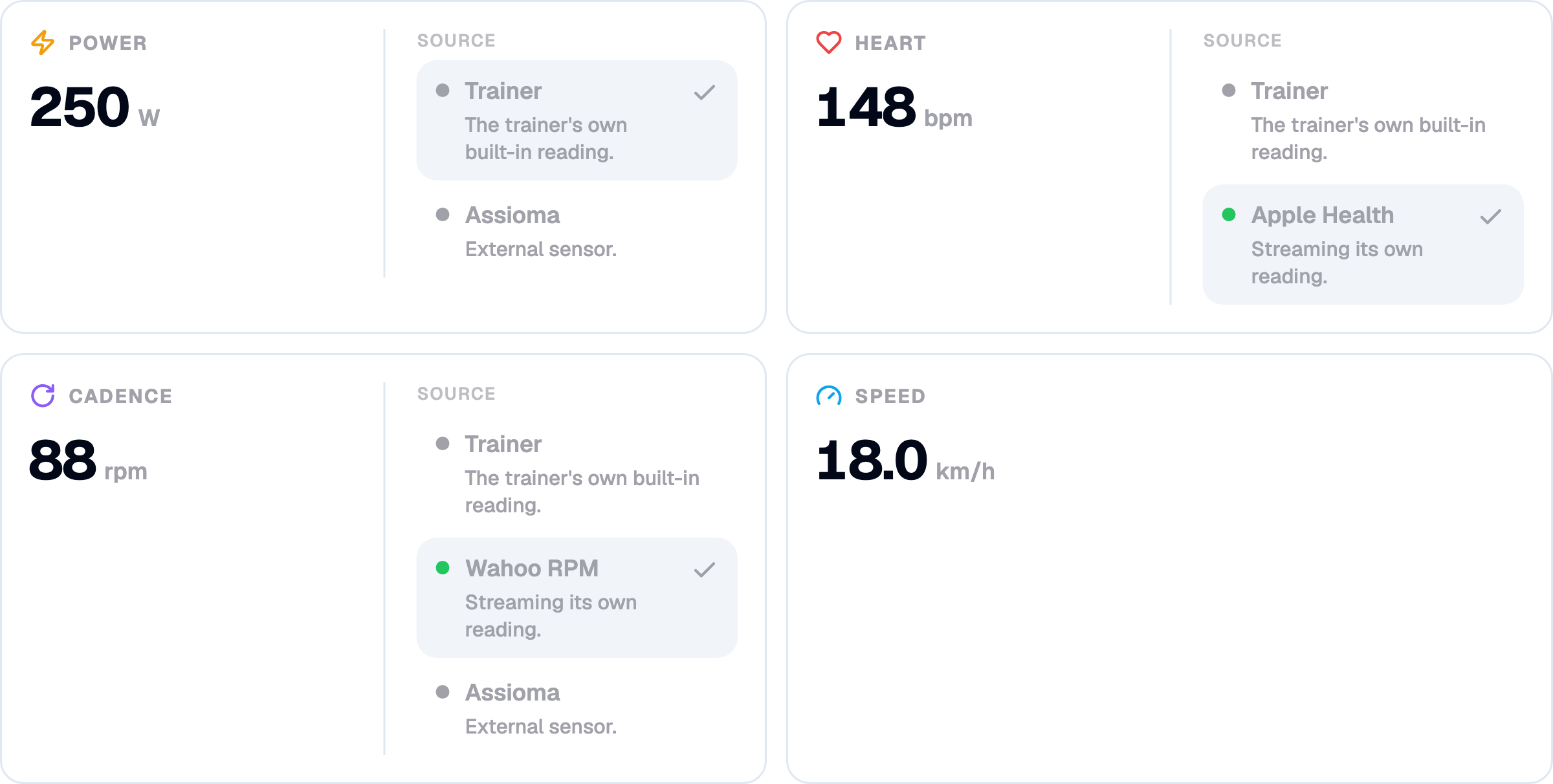
The practical case is the one riders with a pedal- or crank-based power meter keep asking about: they train on that power outdoors and want the same number indoors, not the trainer's estimate. Now you pick the power meter once and every trainer app gets it. The trade-off is the one you'd expect — two power sources disagree, sometimes by a lot, so pick one and stay with it rather than switching mid-block.
If a sensor drops out, BikeControl says so on the tile and falls back to the trainer's reading until it's back, so a flat strap battery doesn't turn into a ride with no heart rate.
AirPods Pro 3 as your heart-rate monitor
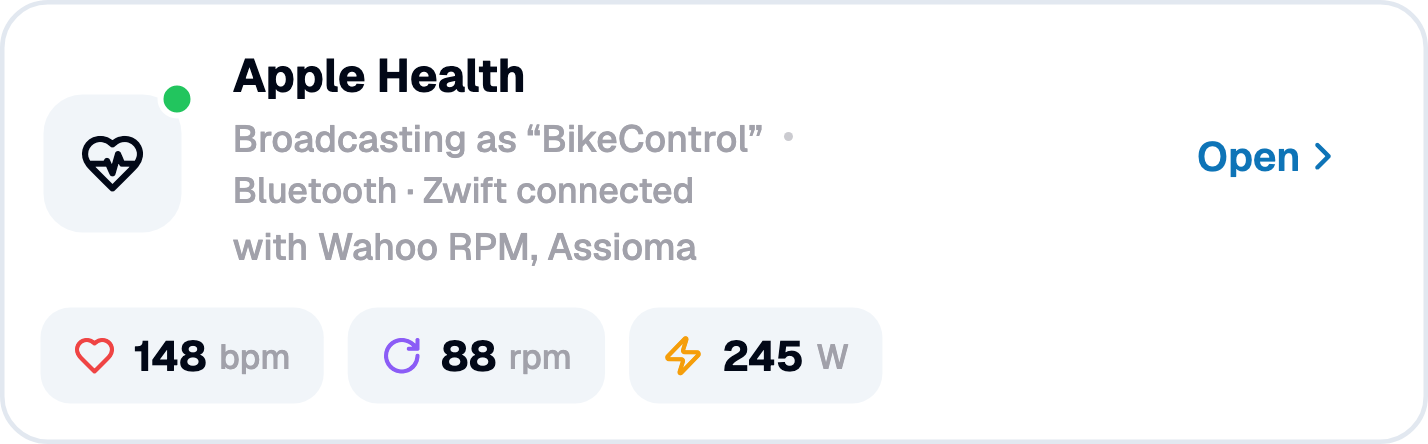
On iOS there's one more source in the heart-rate list: Apple Health, which is how AirPods Pro 3 reach BikeControl — the earbuds don't advertise a heart-rate service over Bluetooth, so Health is the only door. Choose it, allow heart rate in Health, and BikeControl reads your heart rate from Apple Health and sends it on like any other sensor.
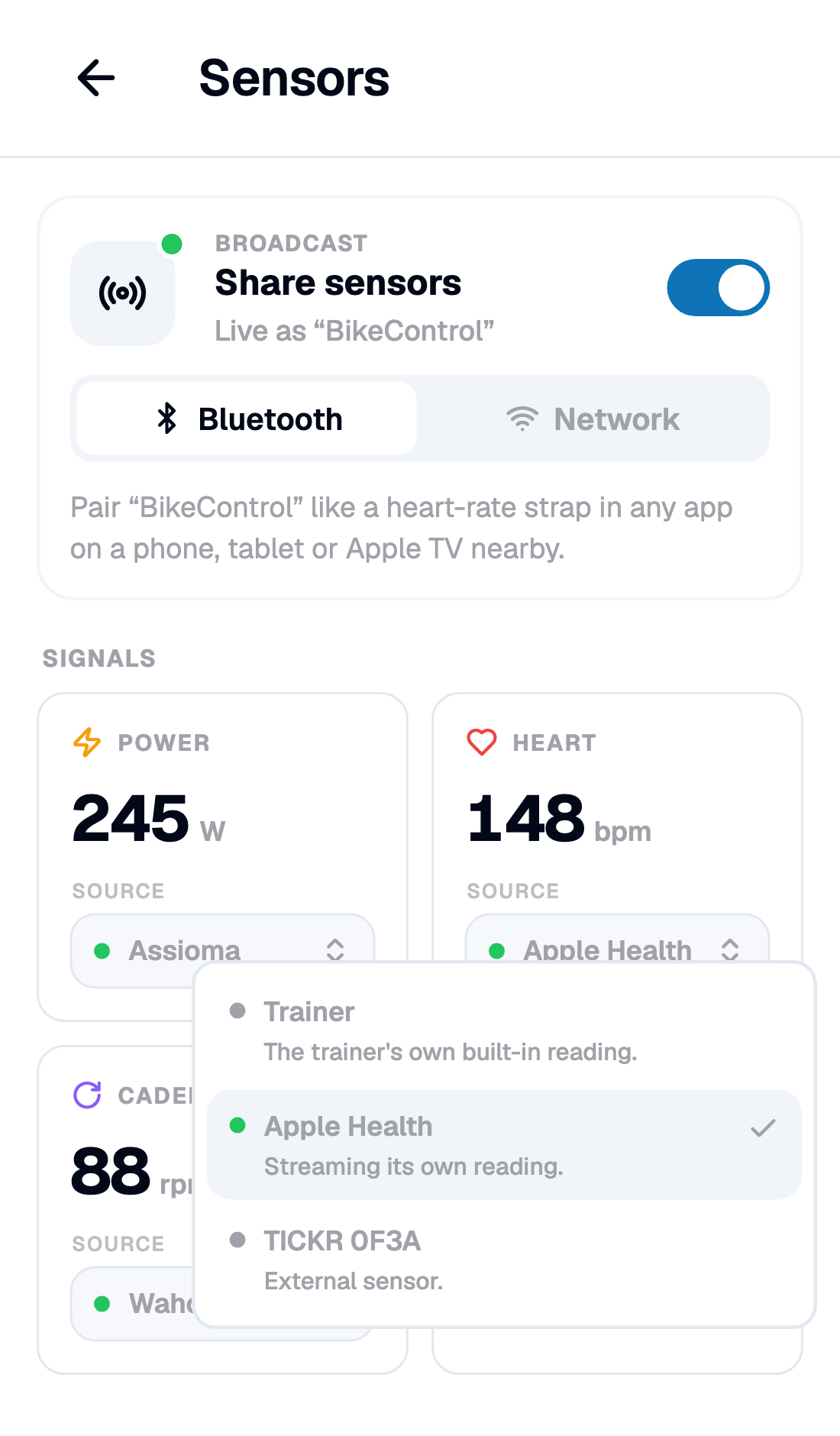
How it works matters, because it decides what you'll see. AirPods Pro 3 only sample heart rate continuously while a workout session is running, so on iOS 26 BikeControl starts one of its own — and discards it when you stop. That session only exists to keep the AirPods sampling; it isn't your ride, and it never shows up as a phantom "Indoor Cycling" in Fitness. The ride you do want in Health is the next section's job. On older iOS versions there's no way to start that session, so BikeControl can only read what Health already has: you'll need a workout running in the Fitness app on the same iPhone, and the readings arrive more sparsely. The source list tells you which mode you're in.
If you want it spelled out for the app you ride, there is a page per app: Zwift, MyWhoosh, Rouvy, Biketerra and TrainingPeaks Virtual.
Android has no equivalent of this. A Bluetooth strap works exactly the same on both platforms; the Apple Health path is iOS-only, and I'd rather say that plainly than have you go looking for it.
Your ride in Apple Health
Ask on Reddit how to get an indoor ride into Apple Health and you'll find years of the same thread. MyWhoosh and TrainingPeaks Virtual don't write rides to Health at all. Zwift writes them without power or cadence, and writes nothing when it runs on an Apple TV. Rouvy writes them from an iPhone or iPad only. So people route the ride through Strava into Health, which loses heart rate and watts, or add a third-party sync app just to close their rings. BikeControl sits in the middle of that ride and already has every number in it, so in 7.0 it can write the workout itself.
Switch on Save rides to Apple Health and answer one Health permission sheet: write access for workouts, power, cadence, speed, distance, energy and heart rate, and no extra read access. From then on, with a smart trainer connected, the ride records itself. It starts when you pedal, pauses when you coast for 10 seconds, and ends five minutes after you stop pedalling, two minutes after the trainer disconnects, or when you tap Finish now on the recording chip (there's a Discard next to it). Rides under five minutes aren't saved. What lands in Health is an Indoor Cycling workout from BikeControl with power, cadence, speed, distance, heart rate and active energy computed from your power. It's the same recorder that already produces the FIT file, and each ride carries a sync id so a retry never creates a duplicate. A short toast confirms the duration, average power and calories.
The thing to watch is double entries. The switch defaults to on, except when Zwift or Rouvy runs on the same iPhone or iPad, because those two write to Health themselves; whenever Zwift or Rouvy is the selected app, the switch shows a hint saying so. You can flip it either way. Heart rate that BikeControl reads from Apple Health, from your AirPods, isn't written back. And this one is iOS and iPadOS only: it's not available on Android, macOS or Windows. Android Health Connect may follow later.
Your trainer app on an Apple TV or a PC? Broadcast the sensors
The Bridge covers the case where your trainer app talks to BikeControl. But plenty of you ride Zwift on an Apple TV or MyWhoosh on a PC with the trainer paired straight to that device — and an Apple TV has no way to read your AirPods' heart rate, or the strap that's paired to your phone. That's what the new Sensors page is for. From the home screen, Use sensors only puts it in the trainer's slot. Wake your sensors, pick a source for each signal, switch on Broadcast, and BikeControl advertises itself as "BikeControl" — a heart-rate strap, cadence sensor and power meter rolled into one device, for whatever your trainer app runs on. It works just as well with no smart trainer at all.
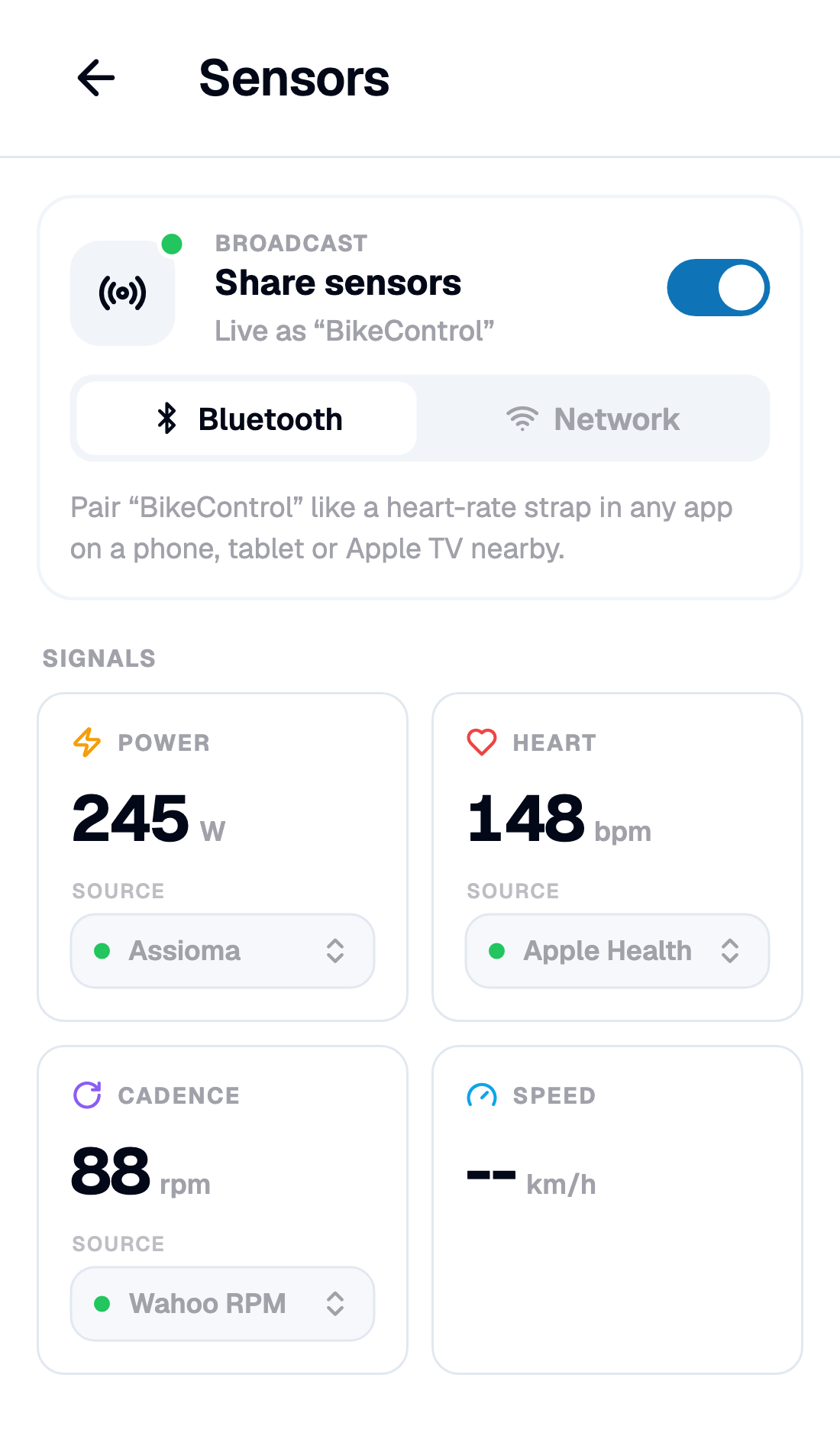
Two transports, and the hint under each tells you when to use which:
- Bluetooth — pair "BikeControl" like a heart-rate strap in any app on a phone, tablet or Apple TV nearby, right next to the trainer that's already paired there.
- Network — apps on this Wi-Fi find "BikeControl" by themselves: Zwift, MyWhoosh or Rouvy on a PC or Apple TV, the same discovery the Bridge already uses for trainers.
Nothing connects until you switch Broadcast on, and the page shows which app has picked it up once one does.
A real cadence sensor makes virtual shifting better
Virtual shifting works out what power your current gear should ask for from your cadence: same gear, faster legs, more watts. That only works as well as the cadence the trainer reports — and some trainers report it badly, late, or not at all. The 6.6 post had a whole section on one that reported nothing.
In 7.0, pick an external cadence sensor as your cadence source and virtual shifting uses it directly. On trainers with a jittery cadence signal the gear feel gets steadier; on trainers that never had one, virtual shifting simply starts working. A cheap crank magnet sensor or the cadence channel of a power meter is enough.
Feel the shift
Two new switches in BikeControl's settings, both off by default, both free: play a sound when shifting and vibrate this device when shifting. Shifting up and shifting down sound different, the last gear has its own cue, and the phone buzzes twice when there's nowhere left to go. The sound follows your media volume and stays well under it, so it doesn't fight your music or your trainer app. Controller vibration, where the hardware has it, is still set per controller.
Smart trainers: what changed since 6.6
A lot of this went out as updates to 6.6 over the last two weeks without ever getting a changelog line, so here it is in one place.
- Trainers without a cadence signal. The 6.6 post covered the ThinkRider XX Pro. The fix is now general: any trainer that reports no cadence gets a felt step on every gear that holds instead of drifting back. The ThinkRider ramp now follows your configured gear ratios, and cadence no longer drops out when the crank stalls.
- Tacx Neo (Garmin) on Windows. Windows surfaces the Neo with an empty advertisement, so it never made the trainer list. It's matched by name now and its services are read on connect.
- Better compatibility across the board. More FTMS and Zwift Ready trainers now behave under virtual shifting out of the box, and a new trainer starts in the mode that feels most like real gears.
- Resistance self-test runs on trainers that report no cadence (and says so), and keeps its step-by-step log in the support bundle.
Also in 7.0
- Need help? The trainer page's feedback box is now one card that opens the Help Center on your setup, screenshot and diagnostics attached. Dismiss it once and it stays gone.
- TrainerRoad finds and controls the Bridge over the network.
- Support and your data: the support composer says what it attaches (a screenshot and a diagnostics bundle, now including the Bluetooth wire trace), and the chat's menu lets you delete a conversation or your account and everything with it.
- Desktop: signing in from a cold start completes the OAuth callback instead of stalling.
- Android: the gear overlay survives release builds; the network self-test no longer raises two false alarms (own-hostname lookup, multicast lock) on healthy setups.
- Small phones: the home sheets scroll so Close stays reachable, and the Virtual Shifting profile buttons no longer squeeze the profile dropdown to nothing.
Sensors — the per-signal sources, the Apple Health path, the Sensors page — and saving rides to Apple Health are part of Pro. Shift feedback is free for everyone.
Get it
Update to BikeControl 7.0, wake a sensor, and pick a source. If you're on iOS 26 with AirPods Pro 3, try the Apple entry first — it's the one I'm most curious to hear about, on trainers and Apple TVs I don't have. The in-app support chat is the place to tell me.
Happy riding! 🚴